Python Plugins
Hexeditor provides python plugin system for exteding functionality and build your own modules.
Standalone plugins are .py files placed in a plugins/ directory.
All scripts have access to the hexedit module, which provides read access to the current file and the ability to create tags.
Each plugin must register its commands via hexedit.register_command(). Top-level code runs once at load time — use it only for imports, constants, and register_command() calls. All file operations belong inside the handler function.
File reading
import hexedit

 # File info
size = hexedit.file_size()          # Total file size in bytes
path = hexedit.file_path()          # Path to the current file

 # Read raw bytes (returns Python bytes object)
data = hexedit.read_bytes(0, 16)

 # Read integers (little-endian by default)
val = hexedit.read_uint8(offset)
val = hexedit.read_uint16(offset)
val = hexedit.read_uint32(offset)
val = hexedit.read_uint64(offset)

 # Big-endian
val = hexedit.read_uint32(offset, big_endian=True)

 # Signed variants
val = hexedit.read_int8(offset)
val = hexedit.read_int16(offset)
val = hexedit.read_int32(offset)
val = hexedit.read_int64(offset)

 # Read null-terminated string
name = hexedit.read_cstring(offset)                 # max 4096 bytes
name = hexedit.read_cstring(offset, max_length=256)

 # Search for byte pattern (returns offset or -1)
pos = hexedit.find_bytes(b'\x89PNG', start_offset=0)
pos = hexedit.find_bytes(b'\x00\x00', start_offset=100, max_search=1024)
Tags
Tags highlight regions in the hex view with a name, color, and type.
hexedit.add_tag(
    name="Magic",           # Display name
    offset=0,               # Start offset in file
    length=4,               # Length in bytes
    color="aa4444",         # RGB hex color (optional)
    type="blob"             # Type (optional): "int", "blob", "string", "stringz"
)
Type affects how the value is displayed:
"int"(default) — integer value"blob"— raw hex bytes"string"— fixed-length string"stringz"— null-terminated string
Plugin tags are stored per-file and persist across tab switches and schema re-evaluations. Closing a file's tab discards its plugin tags.
Status bar
hexedit.set_status("Processing...", 5000)   # Show message for 5 seconds
hexedit.set_status("Scanning...")            # Default 3 seconds
hexedit.set_status("Working...", 0)          # Indefinite (until replaced)
Selection
# Get current selection range
start, end = hexedit.get_selection()   # (0, 0) if nothing selected

# Set selection
hexedit.set_selection(0x100, 0x200)    # Select bytes 0x100..0x1FF
Aliases
Aliases are shared with the schema tag engine. Scripts can read aliases set by the JSON schema and set new ones for subsequent schema processing.
# Numeric aliases
hexedit.set_alias("header_size", 256)
val = hexedit.get_alias("header_size")    # Returns 0 if not found
exists = hexedit.has_alias("header_size") # Returns bool

# String aliases
hexedit.set_str_alias("format_name", "PNG")
name = hexedit.get_str_alias("format_name")
Commands
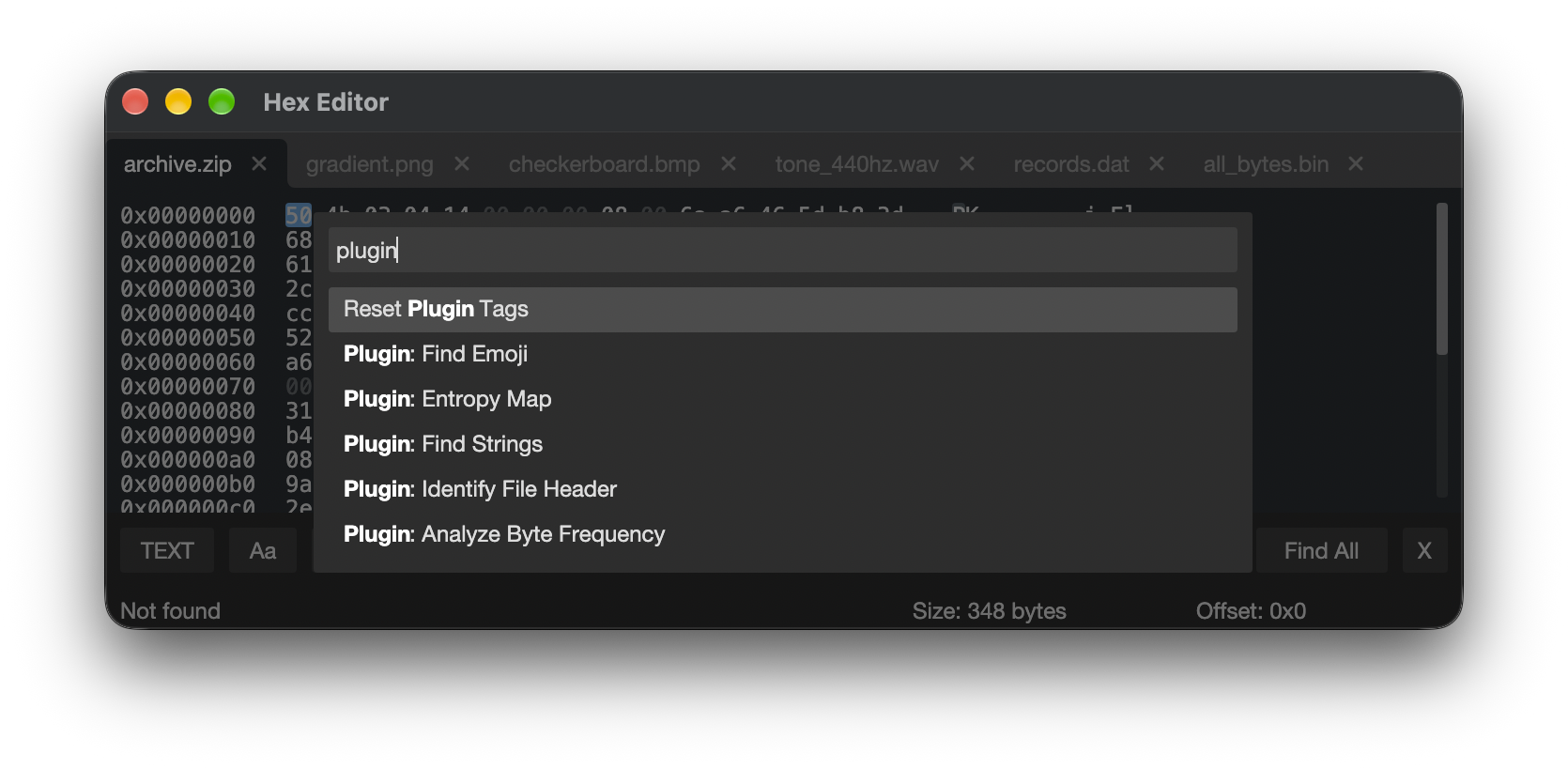
Plugins register commands that appear in the command palette. Commands run in a background thread, so the UI stays responsive.
def my_handler():
    size = hexedit.file_size()
    hexedit.set_status(f"Analyzing {size} bytes...")
    hexedit.add_tag(name="First byte", offset=0, length=1, color="44aa44")

hexedit.register_command(
    id="plugin.my_command",        # Unique command identifier
    name="Plugin: My Command",     # Display name in command palette
    handler=my_handler,            # Callable invoked on execution
    shortcut=""                    # Optional shortcut display string
)
Commands are registered at plugin load time (top-level code). The handler runs later when the user invokes the command from the palette.
Cancellation
When the user closes a file or the application while a plugin is running, the plugin is automatically cancelled. All hexedit.* calls that access the file will raise a RuntimeError, stopping execution.
For long-running plugins, you can check for cancellation explicitly to exit early and avoid unnecessary work:
hexedit.is_cancelled() # Returns True if the plugin should stop
Example:
def run_analysis():
    size = hexedit.file_size()
    block_size = 256
    blocks = size // block_size

    for i in range(blocks):
        if hexedit.is_cancelled():
            return

        data = hexedit.read_bytes(i * block_size, block_size)
        # ... process data ...
Built-in command: Reset Plugin Tags
The command palette includes "Reset Plugin Tags" which clears all plugin-added tags for the current file.
Downloading Python at runtime
The Python: Download Python action downloading an Python distribution from https://github.com/astral-sh/python-build-standalone/releases.
The downloaded Python is stored in:
- macOS/Linux:
~/.hexeditor/python/ - Windows:
%LOCALAPPDATA%\HexEditor\python\